
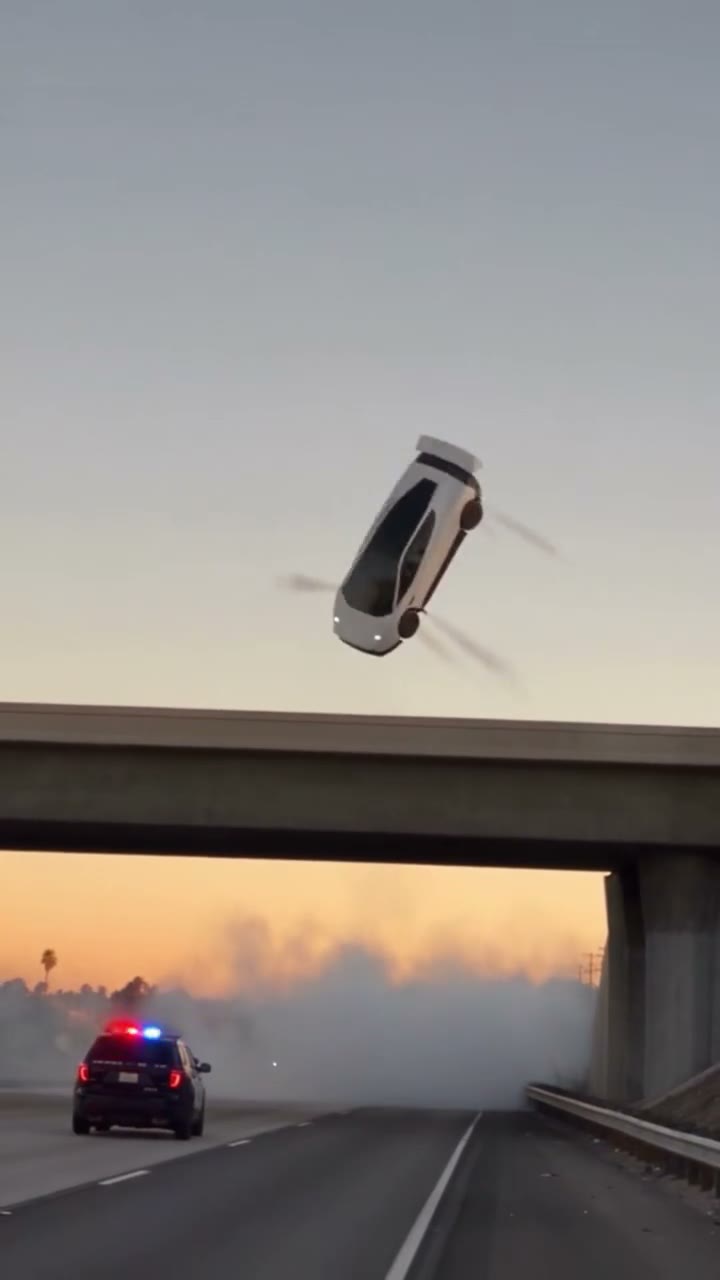
How to make a flying Tesla Roadster AI video: step by step
- Write your own scene. Open the flying car AI video creator and describe the car, one action, the setting, lighting and camera movement. The prompt begins empty; no preset is required.
- Add a photo if needed. Use one image you own or have permission to use when a particular vehicle matters. You can also work entirely from text.
- Choose the length. Pick 5–30 seconds. Start with one short, clear action rather than packing multiple stunts into a single shot. See length-based pricing before choosing a pack.
- Review the generated scene. Inspect the car shape, motion and framing before downloading. A reference photo does not guarantee an exact likeness.
- Prepare the vertical clip for sharing. Keep the 9:16 frame, add any audio or captions in your editor, and identify the footage as AI-generated when publishing.
The format decides the shot
The delivered file is a 9:16 vertical MP4 between 5 and 30 seconds long, rendered at 480p and shipped without audio or a watermark. Those four constraints should shape the scene before you write a word of prompt, because each one removes a technique you might otherwise rely on.
- Vertical framing. A wide traffic shot loses its context when cropped to 9:16. Vertical motion — a lift, a dive, a climb — reads better because the frame has room to travel. Put the horizon high or low rather than through the middle, and keep one subject in frame.
- 480p detail. Badges, panel gaps, number plates and fine trim do not survive at this resolution. Build the shot around silhouette, colour and light instead of small details you expect the model to preserve.
- Five to thirty seconds. Five to eight seconds behaves like a loop: one action, one camera move. Ten to fifteen seconds holds a single beat with a start and an end. Twenty to thirty seconds needs two or three beats, and every extra second is another chance for the model to drift.
- No audio track. Timing has to be carried by the image. Music or voice-over is added later in an editor, so do not write a prompt that depends on a sound cue to land.
A useful way to think about the prompt is a shot specification for a camera operator who has never seen the location: it has to describe what is in frame and how the frame moves, not just the mood of the scene.
Fiction, fact, and the “flying Roadster” claim
A flying car render is a fabricated image however photoreal it looks. It is not a Tesla announcement, a press asset, a demonstration or evidence that a consumer flying Roadster exists. Flying Car AI is independent and not affiliated with Tesla, Inc.; the car name describes the subject, it does not claim a relationship.
That distinction has practical consequences. Synthetic footage falls under platform policy on AI media, and presenting a fictional clip as a real product launch can mislead viewers about what was demonstrated. If you publish commentary about real Tesla news, keep the factual post and the AI render separate, or label the render before the first frame rather than in a comment.
Three premises that survive vertical video
The subject is implausible, so the scene has to give the viewer something to accept it against. These structures hold up because each one sets a visual conflict the model can render in one continuous shot.
Traffic jam escape
The conflict is static versus vertical. Put the camera at bumper height among stopped cars so the Roadster’s lift is measured against something familiar. Give the movement a clear start in the lane and a clear end above the roofline. The premise fails when the frame contains too many vehicles: at 480p the background becomes a mass of shapes and the lift loses its scale. Fewer cars, stronger side light and a fixed low camera solve that.
“Day 1 owning a Tesla Roadster”
This is a narrative premise rather than a stunt, so give it a simple arc. One continuous movement is easier to describe and review than several requested cuts: the car pulls out of a driveway and lifts as it clears the street. Keep the location quiet; a domestic setting is easier to read in nine seconds than a landmark. Do not ask for a key turn, a door opening and a lift in the same clip; the model will merge them.
Low-angle flying-Tesla sightline
The camera looks up and the car crosses the sky. This is the most legible version at low resolution because the subject is a silhouette against a simple background. Its failure mode is scale: if the car becomes a dot, the shot reads as a distant drone. Specify a low angle, a close pass and a direction of travel, and keep the sky simple enough that the silhouette holds.
Writing the prompt as a shot specification
Write a prompt a reader can picture without guessing: one main vehicle, a clear action and a camera position. Conflicting movements and crowded scenes can make the result harder to control. These are starting points for iteration, rather than guarantees about how a model will interpret your words.
- Subject and geometry: the vehicle’s shape and colour, and how it sits in frame.
- Action: one movement with a start and an end, described in space.
- Environment: the street, overpass or skyline, and what sits near the car.
- Camera: angle, height, distance, and whether it is static, tracking or handheld.
- Light: time of day and light direction, which decides how readable the car is.
Spatial language is the difference between a usable take and an average one. “The car rises out of the lane and clears the roof of the car in front” gives the model a relationship to render; “a flying car in traffic” gives it a theme. Keep the field to one to three sentences; the input limit is 12 to 600 characters. Negations are weak constraints, so instead of listing things you do not want, describe an environment with no surface for them to appear on.
Include “Tesla Roadster” if that is the subject you want, then describe the shape, colour and framing. Naming a model alone does not specify the scene or guarantee accurate badges, proportions or details.
Reference photos: the trade-off
One reference image changes what the model has to invent. It anchors shape, colour and some trim, which helps when the car is the point of the shot. The cost is composition: the image can pull its own background, angle and lighting into the render, and a heavily cropped photo gives the model less to work with than no photo at all.
Use an image you own or have permission to use. A well-lit three-quarter view on a plain background gives a clearer reference than a dark or heavily cropped photo. Several cars in one image can make the intended subject ambiguous. If a specific vehicle is not essential, text-only lets you describe the setting and camera without introducing a reference background. Results vary in both modes.
Length, cost, and what you are buying
Length is the main product decision. A ten-second single video is $9.99; five seconds is $4.99 and thirty seconds is $29.99. The price scales with length because the render does: more frames means more compute and a longer window in which the model can fail. That is also why a 30-second clip is not automatically a better purchase than three 10-second clips. Current packs and their length-based prices are listed in the pricing section.
For feed-style publishing, five to eight seconds is usually enough; the loop repeats and the first frame does most of the work. Ten to fifteen seconds suits one story beat. Twenty to thirty seconds is the right choice only when the scene genuinely has two or three beats, because every additional beat increases the chance that the car changes shape mid-shot.
The chosen length is saved on the order and reused for additional videos in the same pack. A different length means a new order. Pack pricing follows the same rate with the bundle discount: three videos from $9.99 and ten videos from $29.99.
Diagnosing a bad render instead of rerolling blindly
Most failed takes fail for a reason you can name, and each reason maps to one prompt change. Change one variable at a time so the next result tells you something.
- Car too small or too large: the framing distance is missing. Specify how much of the frame the car fills and where the camera sits.
- Motion unreadable: direction and camera relationship are missing. Say which way the car moves relative to the camera.
- Wheels, reflections or panel gaps melting: the background or motion is too complex. Simplify the scene, reduce speed, reduce the number of vehicles.
- Text or logos appearing: the scene implies a surface for them. Remove signage, livery and plates from the environment.
- Shape drifting across the clip: too many actions or too long a duration. Cut to one action or a shorter length.
Publishing checklist
- Keep the 9:16 frame intact; a landscape re-upload crops the subject out of the shot.
- Label the clip as AI-generated where the platform offers it, and say so in the caption.
- Add audio in the editor: platform-licensed music, a voice-over or sound design. The delivered file is silent by design.
- Add captions outside the render rather than asking the model to put text in frame.
- Keep factual commentary about Tesla separate from the fictional clip, and do not imply an endorsement.
- Hold the rights to every input image, including people and locations, and do not submit minors.
The terms of service and privacy policy cover rights, credits and data handling in more detail.
Frequently asked questions
Are the flying Tesla Roadster videos on this site real?
The renders on this site are fictional AI-generated scenes built from text prompts and optional reference photos. They are not Tesla announcements, press assets, demonstration footage or evidence of a consumer product. Flying Car AI is independent and not affiliated with Tesla, Inc.
What format is the video?
A 9:16 vertical MP4, 480p, 5 to 30 seconds depending on the length you choose, silent, with no watermark. Music, voice-over and captions are added later in an editor.
How long does rendering take?
Rendering time varies with the chosen length and the provider's queue. There is no guaranteed completion time; check the order page for the current status.
Do I need a photo to make a flying car video?
No. Text-only is fully supported. One reference image can help keep a specific car or person consistent, but it can also pull its own background and framing into the render, and it must be an image you own or have permission to use.
How does the pricing work?
The price scales with length from a ten-second anchor: $4.99 at 5 seconds, $9.99 at 10 seconds and $29.99 at 30 seconds for a single video. Three-video packs run $9.99–$59.99 and ten-video packs $29.99–$179.99 depending on length. It is a one-time payment.
Can I use the video commercially?
Only if you hold the rights to every input and comply with the rules of the platform and the law where you publish. Disclose that the clip is AI-generated where required, and do not present it as real footage or as a Tesla statement.